The Drive-Failure Sound You Should Never Ignore
Most of these problems are fixable — and cheaper than replacing the machine.
GGFix handles data recovery across Greater Copenhagen at fixed, up-front prices from 399 DKK — on-site or drop-off in Ishøj, in English or Danish. You get a clear diagnosis before you commit to anything.
A hard drive that clicks, beeps, or grinds is not making a noise. It is failing, right now, and every extra minute you leave it running can turn recoverable files into permanently lost ones. If you are hearing a rhythmic click, a faint repeated beep, or a grinding whir from a computer that suddenly will not boot or open your files, the single most important thing you can do is stop using it. Not after one more restart to check. Now.
This is the most time-sensitive job we handle in data recovery in Copenhagen, and what you do in the first few minutes decides how much comes back. Below is what those sounds actually mean, why "just trying again" is the thing that loses people their photos, and the honest version of what recovery can and cannot do. Fixed-price diagnostics for every job are on the services page.
What the sounds actually mean
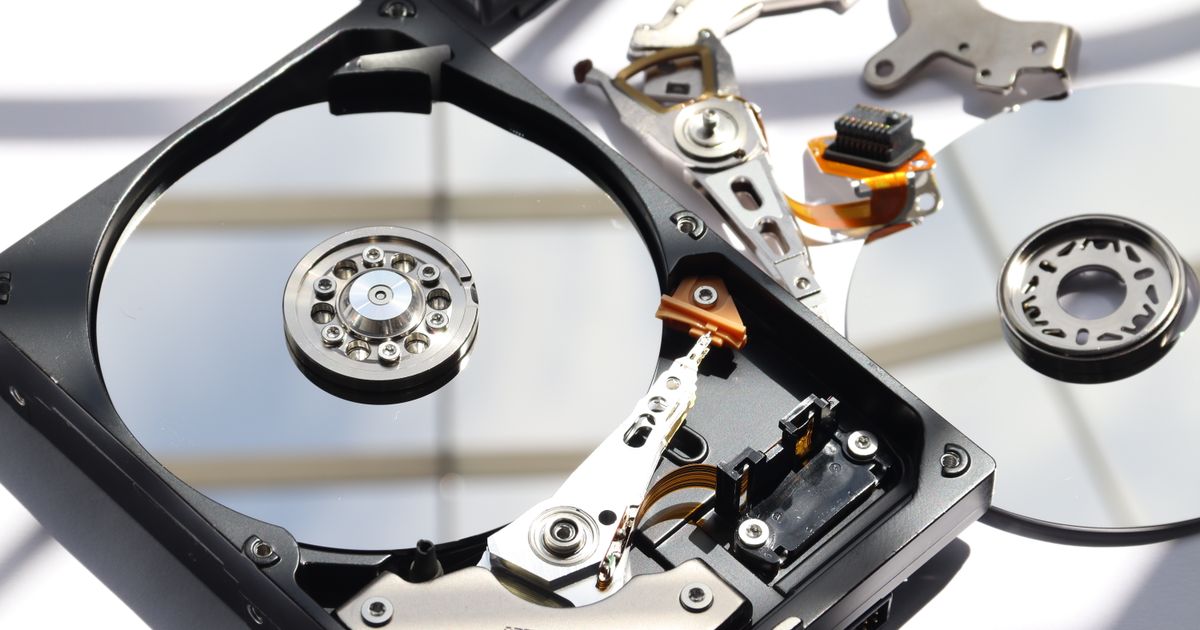
A traditional hard drive is a mechanical device: metal platters spinning at 5,400 or 7,200 RPM while a read head floats microns above the surface. When you hear it, you are hearing that mechanism in trouble.
- Clicking (the "click of death"). The read head cannot find its position and keeps resetting, again and again. This usually means a head failure or a seized motor. It is the most common sound of a dying drive and the most urgent.
- Beeping. The platters are not spinning at all. The motor is stalled, often because the heads have stuck to the surface. The beep is the drive trying and failing to spin up.
- Grinding or scraping. The worst sound. It can mean the head is physically touching the platter surface, scraping away the magnetic layer where your data lives. Every second of this destroys more of what could be recovered.
The common thread is simple: these are mechanical failures, and a mechanical failure gets worse the longer the drive runs. That is the part most people get wrong.
Why "just trying again" is what loses the data
The instinct when a drive fails is to restart, retry, and keep checking whether it will come back. With a mechanical drive, that instinct is the single biggest cause of permanent data loss.
Each time a failing drive powers up, the damaged head passes over the platters again. If a head is scraping the surface, every spin-up grinds away more of the magnetic coating, and the data on those tracks is gone for good once it is physically removed. A drive that a recovery lab could have read on day one can become genuinely unrecoverable after a weekend of someone rebooting it hoping it sorts itself out. The drive is not going to heal. It is only going to degrade.
So the rule is the opposite of the instinct: the moment a drive sounds wrong, power the machine off and leave it off until someone who recovers data can look at it.
What to do — and what to never do
Work down this list. The "do not" items matter as much as the "do" ones.
- Power off now and leave it off. Do not restart to check. Do not run repair tools on it. Every power cycle is a risk.
- Do not open the drive. The inside of a hard drive is sealed for a reason — a single speck of dust on a platter can ruin it. Drives are opened in clean-room conditions, not on a kitchen table.
- Skip the freezer and the percussion myths. Putting a drive in the freezer or tapping it was a desperate trick for one narrow old failure mode. On a modern drive it mostly adds condensation and shock damage, and it can finish off a drive that was still readable.
- Do not keep running recovery software on a clicking drive. DIY software is fine for a healthy drive with deleted files. On a mechanically failing drive it just keeps it spinning while it dies.
- Note what you heard and when it failed. It helps whoever diagnoses it work out whether the fault is mechanical or electronic.
- Get it to a technician while it is still readable. Sooner is genuinely better here in a way it is not for most repairs.
SSDs fail differently — and more quietly
If your machine has a solid-state drive, it will not click or grind, because there are no moving parts. That does not make it safer. It makes the warning signs quieter and the failures more sudden.
An SSD on its way out tends to show different symptoms: files that suddenly will not open or come back corrupted, the drive vanishing from the system and reappearing, or the drive dropping into a read-only state where you can copy data off but not write to it. That read-only state is a gift if you catch it — it means the data is still there to be rescued. The danger with SSDs is that a controller failure can take the whole drive offline with no warning at all, which is exactly why a current backup matters more on an SSD, not less. The early signs of a failing drive are worth acting on the day you notice them.
What recovery can and cannot do
Honesty matters more than a booking, and data recovery is the area where false hope costs the most.
When a drive is caught early — powered off at the first bad sound, not run into the ground — the odds are good. Electronic faults, stuck heads, and corrupted file systems are frequently recoverable. What is genuinely gone is data on platter surfaces that have been physically scraped away, and severe cases sometimes need clean-room work that costs more than the drive or the computer is worth. A straight answer up front is part of the job: GGFix diagnoses the drive first, tells you whether the data is realistically recoverable and what it will cost before any work starts, and on a no-recovery-no-fee basis for the recovery itself. If the data is not coming back, you should hear that plainly rather than pay to find out slowly.
The uncomfortable truth underneath all of this: recovery is the expensive, uncertain fallback. A drive that is backed up is a drive whose failure is an inconvenience, not a disaster. If you take one thing from a clicking hard drive beyond "switch it off," let it be that the cheapest data recovery is the backup you set up before you needed it.
Frequently Asked Questions
Q: My hard drive is clicking — can the data still be recovered?
Often yes, if you stop using it immediately. Clicking usually means a head or motor fault, and those are frequently recoverable while the platters are still intact. The data is lost when a failing drive is left running and the heads scrape the surface, so the best thing you can do for your odds is power off now and leave it off.
Q: Is it safe to keep using a hard drive that is making noise?
No. A noisy mechanical drive is failing, and continuing to use it makes the damage worse with every minute and every restart. Copy nothing, run nothing, and power it down until someone who recovers data can assess it.
Q: Does putting a failing hard drive in the freezer work?
Not on modern drives. The freezer trick targeted one narrow old failure mode and now mostly introduces condensation and thermal shock that can finish off a drive that was still readable. Leave the drive alone and get it diagnosed instead.
Q: My SSD has no warning sounds — how do I know it is failing?
SSDs fail silently because they have no moving parts. Watch for files that corrupt or will not open, the drive disappearing and reappearing, or the drive becoming read-only. Any of those means back up everything you can immediately and have the drive checked, because SSD failures can become total without warning.
Q: How much does data recovery cost in Copenhagen?
GGFix diagnoses the drive first and quotes before any work, with recovery handled on a no-recovery-no-fee basis so you are not paying for a result you do not get. The honest verdict — including when data is not realistically recoverable — comes before you commit.
Want it looked at by someone who does this every week?
GGFix is a Copenhagen technician handling data recovery hands-on. You get an honest call on whether it is worth fixing — sometimes the answer is no, and we will tell you that before you spend a krone.
- Fixed, up-front prices from 399 DKK — no surprise bills
- On-site in Greater Copenhagen, or drop-off in Ishøj
- A clear diagnosis before you commit to any repair
- 8+ years repairing gaming PCs, laptops and workstations
- English or Danish — same-week turnaround
GGFix Technical Team
Writing about hardware monitoring, fleet management, and keeping machines alive. Powered by GGFix.
Related Articles
Why Your Gaming Laptop's Fans Got So Loud
A gaming laptop whose fans suddenly roar is not a dying machine. Nine times out of ten it is dust making the cooling work overtime. Here is what the noise means.
Spilled Liquid on Your Laptop? The First 60 Seconds Matter Most
Spilled liquid on your laptop? Power, not water, is what kills it — and rice does nothing. The first 60 seconds, the mistakes to avoid, and the real fix.
Why Your PC Runs 20°C Hotter Than It Should
A PC running hot is dust and dried thermal paste choking the cooling, not a dying machine. What the heat is doing inside the case — and what a clean fixes.
[ on-site service · copenhagen ]
Got this problem right now?
GGFix offers on-site PC and laptop repair, cleaning and diagnostics across Copenhagen and Zealand. Fixed prices from 399 DKK, based in Ishøj, same-week availability.